🧾 Invoices
Invoices in Dhanman make billing intelligent and effortless — designed for real users, not accountants.
The system automates product, GST, and approval logic, ensuring compliance with minimal manual work.
📘 Overview
An Invoice records the sale of goods or services to a customer.
Dhanman supports the complete lifecycle — from creation, multi-level approval, and payment, to audit and reversal — all traceable and transparent.
💡 Core Principle: No invoice is ever deleted — every action is auditable.
🔁 Invoice Lifecycle
flowchart TD
    A[Draft] --> B[Pending Approval - Level 1]
    B --> C[Pending Approval - Level 2]
    C --> D[Approved]
    D --> E[Paid]
    E --> F[Audited]
    D --> G[Reversed / Canceled]
    G --> A
Stage Definitions
| Stage | Description |
|---|---|
| Draft | Created but not yet submitted. Fully editable. |
| Pending Approval – Level 1 | First approver reviews invoice. |
| Pending Approval – Level 2 | Second-level approver validation (optional). |
| Approved | Finalized and ready for payment. |
| Paid | Payment recorded manually or via gateway. |
| Audited | Locked after verification; prevents modification. |
| Reversed / Canceled | Invoice canceled before audit — returns to Draft state. |
🧩 Key Highlights
| Feature | Description |
|---|---|
| 🧠 Customer-specific Products | Each customer can have pre-linked products or services, automatically prefilled on selection. |
| 💡 Auto GST Intelligence | Each product carries its configured GST rate. The system determines CGST + SGST or IGST automatically based on customer state. |
| 🔁 Recurring Invoices | Schedule weekly, monthly, or yearly billing. Ideal for maintenance or rent. |
| 📋 Copy Existing Invoice | Duplicate from any previous invoice — all details and taxes included. |
| ⚙️ Multi-Level Approvals | Two configurable approval layers (Company or Account level). |
| 📊 Dashboard Insights | View invoices by status, overdue count, and financial year performance. |
| 🧾 Smart Defaults | Account mappings, tax preferences, and numbering handled automatically. |
🖥️ Invoice Dashboard
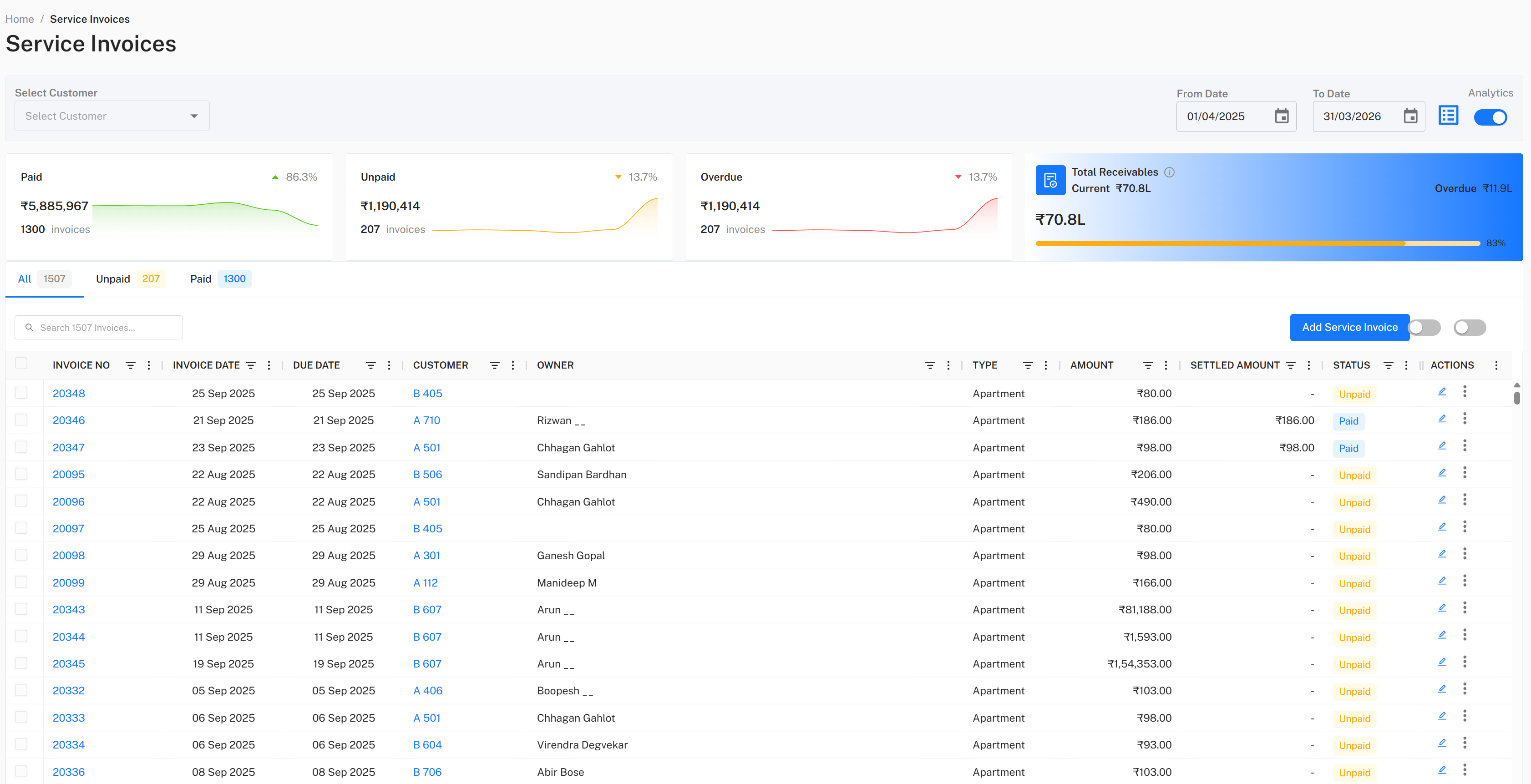
The dashboard offers:
- Filters for Draft, Pending, Paid, Audited, and Reversed
- Graphs for total billed, collected, and outstanding
- Trends by month or quarter
- Quick actions for New, Copy, or Import
🧾 Creating a New Invoice
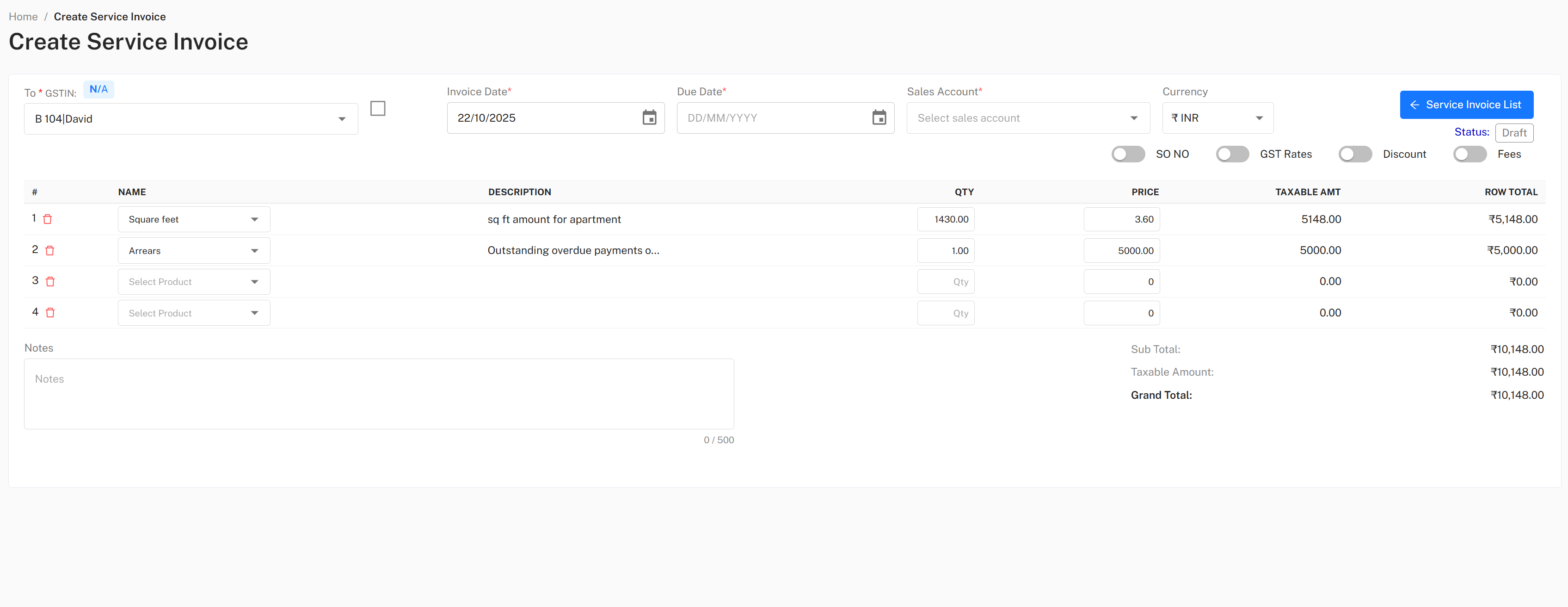
- Navigate to Income → Invoices
- Click ➕ New Invoice
- Select a Customer → linked products auto-load
- Set Invoice Date, Due Date, and Payment Terms
- Add or adjust Items/Services
- GST rates applied per product
- System picks CGST + SGST (same state) or IGST (inter-state)
- Add optional Discounts, Shipping, or Adjustments
- Add Notes or Terms & Conditions
- Click Save as Draft or Submit for Approval
💡 Tip: Copy from an old invoice to reuse customer, items, and taxes.
🔁 Recurring Invoices

flowchart LR
    A[Original Invoice] --> B[Recurring Template]
    B --> C[Auto-Generated Invoice]
    C --> D[Approval → Payment → Audit]
Setup Steps
- Choose Schedule Recurring from invoice actions
- Set Frequency (Weekly / Monthly / Quarterly / Yearly)
- Define Start Date and optional End Date
- The system generates new invoices automatically using the same items, taxes, and customers
🧠 Approval Workflow
| Level | Scope | Typical Role |
|---|---|---|
| Level 1 | Organization | Finance Manager / Admin |
| Level 2 | Account Level | Treasurer / Accountant |
Both approvals are logged permanently for audit trail.
💸 Payments
Once approved: - Record manual payments (cash, cheque, transfer) - Capture gateway payments (e.g., UPI, cards) - Apply Advances / Credits - Integrate with Bank Reconciliation
Payment confirmation transitions the invoice to Paid.
Only Audited invoices are fully locked.
🔁 Reversals (Canceling Invoices)
- Use Reverse Invoice before audit to cancel incorrect invoices.
- Invoice becomes Reversed / Canceled and reverts to editable Draft.
- No ledger or journal entry is posted until re-approval.
⚠️ Once audited, reversal isn’t allowed. Use before locking.
📦 Importing Invoices
To import existing invoices:
- Go to Income → Invoices
- Click More → Import Invoices
- Upload a
.csvor.xlsxfile - Map columns → preview → confirm
- The system validates customers and GST automatically
💡 A sample format is downloadable from the import page.
🧭 Quick Actions
| Action | Location | Description |
|---|---|---|
| ➕ New Invoice | Dashboard | Create fresh invoice |
| 📋 Copy | ⋮ Menu | Duplicate existing invoice |
| ⏰ Schedule Recurring | ⋮ Menu | Automate periodic invoices |
| 🔁 Reverse | ⋮ Menu | Cancel and return to Draft |
| 📥 Import | More Menu | Bulk upload invoices |
💡 Best Practices
- Define customer-product mappings for repeat clients
- Let GST auto-apply — avoid manual overrides
- Review Pending Approvals weekly
- Use Recurring Invoices for subscriptions or maintenance
- Prefer Reversal instead of deletion for clean audit logs
📚 Related Topics
© B2A Technologies Pvt. Ltd. – Dhanman Product Documentation (2025)
Smart. Simple. Transparent.